
SkyeBrowse Introduces Crash Analysis Tools and Drone-Based Crowd Counting
New features bring vehicle damage measurements, collision review and estimated headcounts into the company’s mapping platform.
SkyeBrowse has introduced tools for reviewing vehicle crashes and estimating crowd size from drone images. The update adds Impact, a multi-vehicle collision review tool, and brings Crowd Counter to the SkyeBrowse Flight App on the DJI RC Pro. It also expands the company’s Crush Analysis and Claims workflow.
The company turns video from drones, phones and other cameras into 3D models. Its new tools aim to help public safety teams use those models to review crashes after documenting a scene.
Reviewing Vehicle Damage and Collisions
Crush Analysis aligns a scanned vehicle with a 3D reference model. It measures damage at six points and calculates collision metrics, including an estimate of the change in speed during impact. The Claims tool reviews up to eight photos and suggests parts to repair, replace or inspect. It also provides repair-cost and state total-loss screening, according to SkyeBrowse. A licensed adjuster and the insurer’s policy terms determine a claim’s outcome.
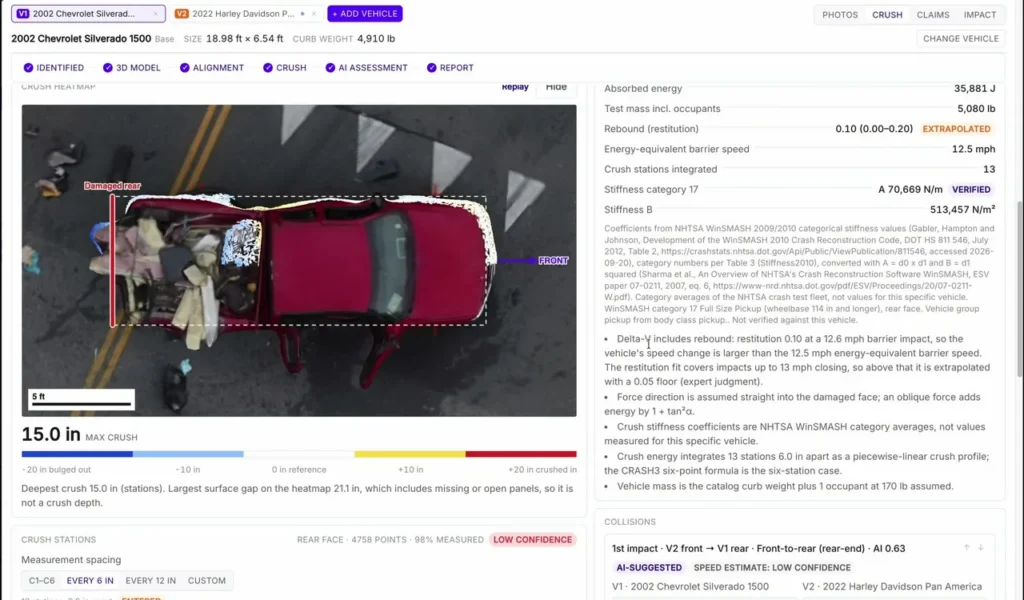
The company’s latest newsletter also introduces Impact. The tool places multiple vehicles in an editable scene diagram, shows speed estimates for vehicle pairs and creates an animated 3D replay. Investigators can adjust vehicle positions and approach paths as they review the evidence. SkyeBrowse says the tool supports motorcycle cases.
A separate Investigate option guides users through available crash facts, vehicle identification, damage analysis and claim review. It flags steps that still need a person’s review and asks before running paid AI features. SkyeBrowse also generates a downloadable PDF report with the crash measurements. The results remain available in the 3D viewer, where another reconstructionist can inspect the scan and check where each crush measurement was taken.
Making the Workflow Easier to Use
Ease of use is central to SkyeBrowse’s approach. In a recent DRONELIFE interview, CEO Bobby Ouyang described a common problem for growing drone programs: a few specialists know how to turn captured data into results, while everyone else depends on them. SkyeBrowse aims to make video capture, model creation and sharing simple enough for more people to take part. The guided Investigate workflow extends that idea to crash review by showing users the next step and identifying where human judgment is still needed.
Counting People From a Drone Image
Crowd Counter is now available in the SkyeBrowse Flight App on the DJI RC Pro for enterprise drones. A pilot can take a photo and receive an estimated count of the people visible in it. SkyeBrowse says Public Safety & Enterprise customers receive unlimited counts; users on other plans receive three free counts per day.

Crush Analysis and Claims are free on every plan through October 31, 2026. After that, SkyeBrowse says they will be included with Public Safety & Enterprise models. (See pricing details here.) For agencies handling more crash scenes and drone flights, the value of these tools may lie in helping more staff move from capture to a reviewable result without relying on a single mapping expert.