
 Photo credit: 51 Drones
Check out the Best Deals on Amazon for DJI Drones today!
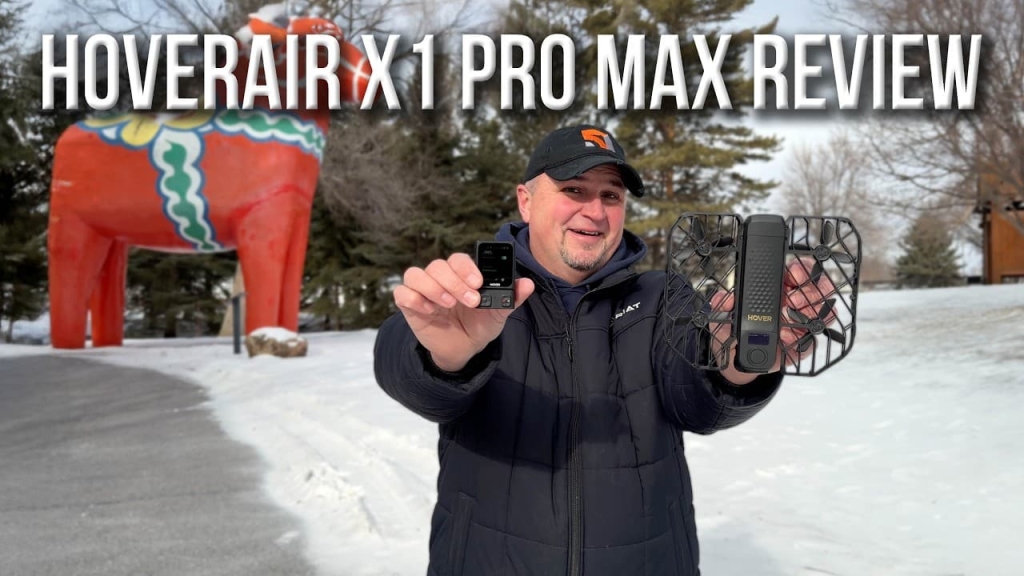
I bought the Hover Air X1 Pro Max back in June of last year because someone told me that it could track just about anything as long as it can see a person. Now, all of my DJI drones are great at tracking people, cars, boats, and bikes, but I am an avid ATV user, and none of my drones can track me when I’m riding on my four-wheeler. The other reason I thought this drone would be great is because I wanted a drone that I could be less careful with — something that was lightweight and durable enough to just be confidently shoved in a pocket or thrown in the console without worrying about it being broken.
So, after seven months of using this drone, I can say that this little thing has exceeded both of those expectations. That being said, there are some things that I hope Zero Zero Robotics improves with their next version of this drone, and we’ll talk about those things as well.
My name is Russ from the 51 Drones YouTube channel, and it’s my hope that you walk away more knowledgeable about the Hover Air X1 Pro Max so you can decide if it’s a drone for you. Although I purchased this drone myself, Zero Zero Robotics did offer to sponsor this video and they requested that I share my honest thoughts with all of you. So, this is just going to be a high-level review after using the Pro Max for the past seven months.
You can also find my articles on my DroneXL author page.
Build quality and first impressions
When I first unboxed the X1 Pro Max — which I’m going to refer to as the Pro Max for the rest of this article because it just takes too long to say Hover Air X1 Pro Max — I can honestly say that I was genuinely impressed with not only the packaging, but also the build quality of this drone. You can tell that the materials used for the drone and all of the components were designed with longevity in mind. This drone, as well as the beacon, the control sticks — everything is meant to tolerate less than gentle care. I think the only thing that could actually harm this is water. So yes, this drone is not waterproof. Be very careful if you’re going to fly this drone around water.
On day one, I just did a simple follow me test as I walked around. I wanted to see if the drone stayed steady when it’s following a slow-moving subject or if it would kind of sway back and forth, which is very common with many tracking drones. There were a few times where the flight path varied, but overall it followed me in a pretty straight line, so I was happy to see that. I also had my Mavic 4 Pro follow me at the same time because I wanted to see how the Pro Max behaved as it was following me and to compare how they did against each other while tracking me.
ATV tracking: The main reason I bought this drone
I did not use the beacon for the first few flights because I wanted to see how the drone did without the extra help. The beacon has a feature called Hover Link that allows the Hover Air drones to maintain tracking if you go beyond the visual tracking ability of the drone. It basically enhances your tracking experience.
The next tracking test I did was with my ATV because honestly, that is the main reason that I bought this drone. I wanted to be able to capture some moments when I was riding. Again, I left the beacon at home because I wasn’t planning on going really fast or anywhere real challenging. And the Pro Max performed wonderfully. I was really excited that I finally, after all of these years, had a drone that could track me when I’m on my four-wheeler.
For the rest of the summer and all of the fall, this drone either lived in my ATV or on my boat. I really didn’t do much more as far as testing it because it was doing what I bought it for. I was just enjoying the drone for what it was.
All the flight modes you could want
Another great selling point for the Pro Max is all of the different flight modes. This drone is designed to document the human experience, and the various flight modes allow the user to do that creatively. Here’s what’s available:
Hover mode is where the drone just sits in place, and you can set it to track you or not track you while it hovers there. Zoom out is basically a droney. Follow is what most people are going to use on this drone. Orbit is where the drone circles around you. Spiral mode is just like orbit except it climbs as it circles around you. There’s also bird’s eye, dolly track which follows you from the front, ski mode, cycling mode, and indoor follow mode which has advanced path replication for slow speed turns and tight corners.
One thing I’ll say about indoor follow mode — when I tested it, it’s pretty jerky and kind of inconsistent. I actually think regular follow mode works a little better than indoor follow mode. Honestly, I think the best way to fly this indoors is manually and in cinematic mode.
The last two modes are 360 spin, where it just hovers in place but spins around, and angle track, which was recently added. That’s where the drone follows you from the side.
All of these settings can be fine-tuned by holding down on the left or the right outer circle buttons and then confirming with the center button. You can see the current settings on the little tiny display on top of the drone.
The display and Omni Terrain mode
Speaking of the display, although it’s very small, it’s very simple and easy to understand. It shows you what mode it’s in, the secondary settings below that, and at the very top, you’ll see the Omni Terrain indicator, which you should really make sure is enabled before you launch, especially if you’re going to be flying this drone over any water or snow.
Omni Terrain is best understood as a special operating mode that helps the drone handle bad ground reference environments where pure vision navigation would be less stable — we’re talking about water or snow-covered ground. All you have to do to make sure Omni is enabled is just wait about a minute before you launch. You’ll see it light up and then you know you’re going to have that extra security.
Also on the display is the amount of space left on the SD card and the remaining battery level of the drone.
Honestly, I don’t use many of the automated modes. I just use follow mode, the dolly track, and angle track. The other modes really aren’t that useful for me, but I can see for travel enthusiasts who want to capture their environment in more creative ways, they all really serve a purpose.
So many ways to fly
Another huge selling point with the X1 Pro Max is the many ways that you can fly it. Yes, it is meant to be a selfie drone, which means that you can open it up, turn it on, push a button, and it’s going to fly and record however you want it to. There’s no extra parts, no setup, nothing to attach, nothing to wait for. It’s fast, convenient, and fun. And it’s the biggest reason to get this drone.
You can get by with just buying the drone and then maybe a couple of batteries — maybe three batteries because the battery life is not really great on this — but you would have no regrets if you just bought the drone and a couple of batteries. You can do so much with just this. The best drone is the one that you have with you. And as light and compact as this thing is, this is a drone that you can take literally anywhere.
It can also be flown with your mobile device. You just install the Hover app, connect it to the drone, and start flying with your phone. Out of all of the drones that I’ve flown with a mobile device over the years, this is the only one that is actually easy to control with the app. It’s responsive, intuitive, and it’s nice to be able to see what the drone sees when you’re flying. Using your phone also makes it easier to change all of your settings.
The beacon is a must-have
Next, you can fly the drone with the beacon. I think this is the coolest way to fly because not only can you control the drone with the little control tabs, but you can change all the settings from the screen. The best thing about the beacon is that you have Hover Link, which provides a much stronger connection to the drone. It can follow you more accurately, and it can find you if it happens to lose you briefly when it’s tracking you, like if you go behind a tree.
Keep in mind that even though it’s better with a beacon, it’s still not infallible. If you move too quickly, it’s going to lose track and get stuck there or possibly run into an obstacle. It still uses vision tracking as its primary way to track you.
The beacon is incredibly cool because it’s so small. It’s not much more to carry. You can just slip it in your pocket. It gives you better tracking and you can change the settings without having to land the drone. In my opinion, the beacon is a must-have.
When I first got the drone, I was using the beacon rarely because I wanted to see how the drone did when tracking me without it. But after I started using the beacon, the way that it tracks you is so much better. It’s so much more accurate. It keeps track with you when you’re going faster. And if it loses sight of you — because the Hover Air drones rely on vision to track you — without the beacon, it’s not going to find you. It’s just going to stop. If you have the beacon, it will try to find you. It will catch up to you. The beacon is my absolute favorite thing about this drone.
Control sticks and controller setup
If you have the control sticks, you can use these in three different ways. If you use one control stick with the beacon — they attach really easily, it’s magnetic, they just snap right on there — you can control the Pro Max with motion. Even though I don’t use the control sticks with the beacon very much to fly the Pro Max, I do like to use it as a motion controller. You just attach the right joystick to the beacon, hold down the button on the back, and point it in whatever direction you want the drone to go. Just being able to move the stick around and control the drone with motion is one of my favorite things.
If you use both control sticks, you attach both of them to the beacon, put down the handles, and you have a regular conventional controller with grips. Plus, you have the screen of the beacon and the ability to change your settings easily.
Finally, you can use this setup with your phone. You put your phone in the holder and you can fly the Pro Max like you would any other drone using your mobile device as the monitor and control screen.
What I actually recommend buying
You have a lot of flexibility when it comes to how you fly the drone. My opinion is that you really don’t need the control sticks. I would suggest just getting the drone and spending a little extra money on a couple more batteries, or I would get the drone-beacon combo and at least one more battery. If you want to fly this like a regular controller-based drone, there are better options out there for you. You don’t buy this drone for that purpose. You buy this drone to be able to capture yourself more easily as you live your best life and try to do it hands-free, as conveniently and as quickly as possible.
Which begs the question — did I really need to spend $1,100 for the full combo? If I could do it again, I would honestly just get the X1 Pro beacon combo and then one extra battery. I am never going to use this drone to create professional videos. It’s only for recording fun family moments and to have a drone with me all of the time.
Image quality: 8K, HLG, and HLOG
The Pro Max has 8K and the ability to record in HLG and HLOG, which gives you way more flexibility when you’re editing your footage. I think the video footage from this drone is exceptional when you consider that it only has a 1/1.3-inch sensor. It’s sharp, the colors are great, and if you record in HLOG, then you can be really creative with your footage. You can also capture 48-megapixel photos with it.
As far as 8K, I actually don’t see any reason for it. The only reason to record in 8K is if you’re going to crop into it when editing. There’s no need to deliver full 8K footage or post 8K footage anywhere unless you’re a big-time filmmaker and your video is going to be up on the big movie screen. Another disadvantage of 8K is the files are tremendously big — you need a lot of space if you’re going to save 8K footage. And when you record in 8K, you can’t record in HLOG if you want log footage. So, there are some drawbacks to 8K, and honestly, I don’t think you need it.
X1 Pro vs. Pro Max: Which should you get?
So that begs the question, should you get the X1 Pro or should you get the Pro Max? If you’re going to get it just for 8K, don’t do it. There’s no need. But if you’re looking at the Pro Max because it has a longer battery life, faster speed, the ability to record in log, a wider field of view, and double the internal storage at 64 GB, then yes, get the Pro Max.
If you’re just going to record in 4K most of the time, use the normal color profile, and you’re never going to forget your micro SD card at home, then the X1 Pro is probably a more reasonable choice for you.
Durability that impressed me
I think the best thing above all about this drone is how durable it is. I’ve seen videos of people crashing their drone much more than I have. I’ve crashed this a few times, but they’ve been minor crashes — into a tree and then landing in the snow, really not that big of a deal. But I’ve seen people try to destroy this drone and it just keeps going. It’s like Spider-Man. It can take a beating and still save the world.
The downsides: Battery life, wind, and cold weather
Now, the downsides. I wish the battery lasted longer. I hope in the next version they improve that because right now I’m only getting about 13 to 14 minutes of flight time. That’s not terrible because I’m usually only flying it for two or three minutes at a time while I get a couple of shots, but it would be nice to have that extra battery life. This drone only weighs 194 grams, meaning they could increase the size of the battery significantly and still be under 250 grams.
Secondly, don’t have too high of an expectation for flying this drone in high winds. It does have an advertised Level 5 wind rating, which means 25 miles per hour, and it can fly in those types of wind conditions. However, it has a very difficult time with sudden wind gusts. Sustained wind, no problem. But at 194 grams, this drone is susceptible to being swept away with one quick burst. If you’re going to fly this in wind, keep it closer to the ground if possible. Try to fly in areas that have a windbreak. And if you don’t have one, make sure it’s not a gusty day. Windy day, not bad. Gusty day, be very careful.
I was flying the Pro Max in negative 15 degrees Fahrenheit, and the battery life is definitely affected by the cold temperatures. I got only 9 minutes of flight time out of this drone in those conditions. You’re probably not going to be flying in those extreme conditions, but just be aware if you are — it’s significantly affected.
Small screen, big problem for some
One more thing — if you’re using the control sticks with the beacon as your screen and you have less than optimal vision, it’s really hard to have situational awareness. My recommendation if you’re going to use the sticks to fly this drone is to attach your mobile device so you have a nice big screen and you’re able to see what’s around you. I have to wear readers, so that’s something to be aware of. The beacon is a pretty small screen if you have poor vision.
Final thoughts on the Hover Air X1 Pro Max
The Hover Air X1 Pro Max is a super fun, compact drone that’s perfect for taking anywhere and being ready to capture quick aerial footage of yourself or your family and friends. It’s super durable, it has great video quality, and as far as selfie drones go, you won’t find one better.
It’s on the higher end of pricing, so if you don’t need 8K or the ability to record log video, I would take a look at the X1 Pro, which is just as fun and durable at a lower cost.
If you have any questions about the Hover Air drones, let me know in the comments. As always, fly safe and fly smart.